The teaching assistant works from everything in your class, including assessments, student conversations and your Library. Ask it what you'd ask a colleague who had read every transcript.
Ask a question
Choose Teacher assistant in the sidebar and type your question, or pick one of the suggestions to get started.

Specific questions get the most useful answers. Here are some to try:
- Who's falling behind this week, and on what?
- What should I reteach on Monday?
- Which students are shaky on the difference between weather and climate?
- Plan tomorrow's lesson around what students got wrong on the ecosystems assessment.
- Draft a note home about Maya's progress this term.
Check the answer
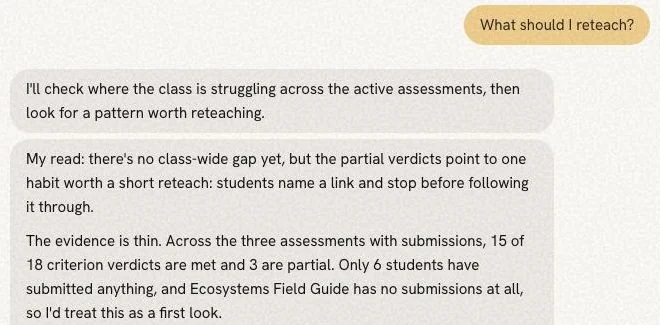
The assistant shows its reasoning and says when the evidence is thin. Here it was asked what to reteach, and it pointed out how little it had to go on before answering:
Ask it to do something
The assistant can also do work for you when you ask. For example, it can write a page, draft a space or an assessment, add a student, or remind students who haven't started. It reports back on what it did, so read its reply to confirm the result.
How much you can use it
The free plan includes light use, and paid plans include generous use. The allowance is measured over the next five hours and across the month, and you can see both in Plan & billing. Plans, students and billing has the details.